AI Usage Clock
Download

Desktop widget · Open source

See every AI limit. Know every reset.

One small desktop widget for the usage limits of your AI services. It also picks up Codex and Claude reset announcements: a heads-up when a reset is announced ahead of time, and a place to look when your usage suddenly drops to zero.

v1.0.0 · Windows · macOS beta · Linux beta

Why AI Usage Clock

The problem

Every AI service keeps its limits in its own corner.

The fix

Your AI limits in one place.

Claude, Codex, Antigravity, OpenCode Go, GitHub Copilot, and OpenRouter, side by side, each with its own usage bar. Active limits also show the time left next to the bar.
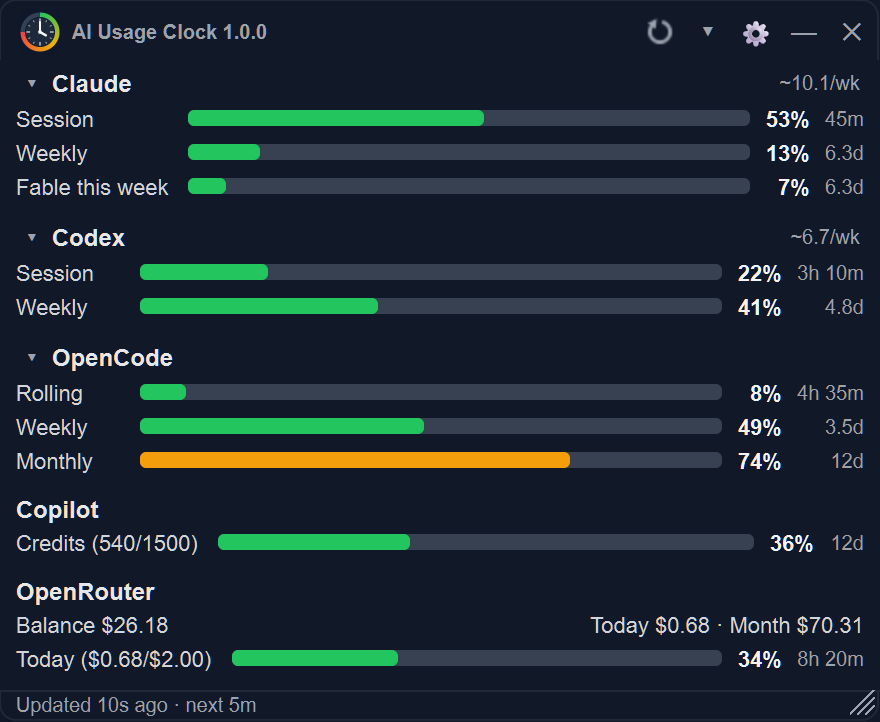
AI Usage Clock full mode listing Claude, Codex, OpenCode, Copilot, and OpenRouter, each with usage bars and the time left
One widget, several services, each with its own bar. Sample data.

The problem

Then your usage drops to zero, and you do not know why.

The fix

A heads-up before some resets. A place to check after the sudden ones.

Turn on reset announcements and AI Usage Clock picks up Codex and Claude reset announcements. Some are announced ahead of time, so you can get ready. Others come out of nowhere: the tile keeps the latest announcement in view, with one click to the original post.

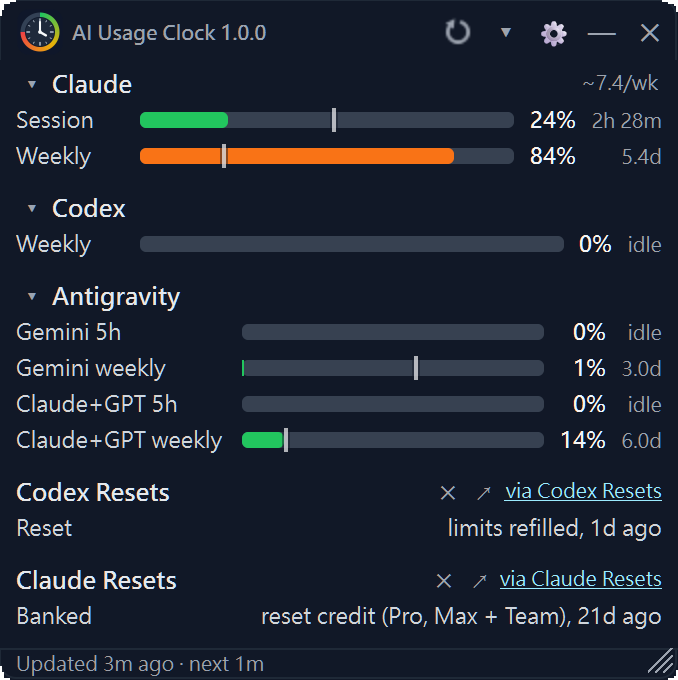
The Codex Resets tile showing Reset, limits refilled, 1d ago, and the Claude Resets tile showing Banked, reset credit, 21d ago
The Codex Resets and Claude Resets tiles, captured from a running 1.0.0 release. Usage values reflect the time of capture.

The problem

Not every desk has room for another window.

The fix

Small when you need it small.

Compact mode shrinks the widget to one pill per service.

Compact mode: one pill per service
Compact mode, one pill per service. Sample data.

Get notified when one appears

Optionally get a notification when a new announcement shows up (native notifications on Windows), with a separate switch for each type. Reset announcements and their notifications are off by default.

It runs on your computer

There is no AI Usage Clock account, server, or telemetry. API keys are kept in your operating system's secure storage.

Supported services

What you see, and how it connects.

  • ClaudeSession · Weekly

    Plus the weekly Fable limit on plans that have one. Sign in through your browser (Google and passkeys work), or paste a session cookie.

  • Codex (ChatGPT)Session · Weekly

    Same as Claude: sign in through your browser, or paste a session cookie.

  • Antigravity5-hour · Weekly

    Gemini and Claude+GPT usage. Reads your local agy command-line tool; no account or key in the app.

  • OpenCode GoRolling · Weekly · Monthly

    OpenCode API key.

  • GitHub CopilotMonthly AI credits

    Used against your plan's allowance, resetting on the 1st. Fine-grained GitHub personal access token.

  • OpenRouterSpend today · This month

    An optional daily budget; balance and model activity with a management key. OpenRouter API key.

Claude, Codex, and GitHub Copilot are on by default. The other services, and the reset announcements, are switched on in Settings. You can track more than one Claude, Codex, or OpenCode Go account.

Reset announcements

Three moments around a reset.

AI Usage Clock picks up reset announcements, so you get a heads-up when one is announced ahead of time, and can see what happened when it was not.

  1. Ahead of time

    Announced: A reset is announced before it happens.

    That is your heads-up to get ready. This type comes from Codex. Beside it sits a Watch row, an AI forecast of how likely a reset is. It is not an announcement, and it never sends a notification.

  2. When it happens

    Reset: Limits have been refilled.

    The tile shows the latest event and how long ago it happened. Banked is a related type: you were granted a reset credit that you can redeem yourself. Claude shows Reset and Banked.

  3. Later, when usage reads zero

    Some resets come out of nowhere.

    When your usage suddenly drops to zero, open the tile to check whether a reset just happened. The latest announcement stays in view, with one click to the original post.

Optional, and off by default. Announcements come from two independent third-party trackers, codex-resets.com and claude-resets.com, and can be late or wrong, so check the original post. Notifications are optional too, with a separate switch for each type.

FAQ

Questions, answered plainly.

How do reset announcements work?

They are off by default. Turn them on under Settings → General with Codex Resets or Claude Resets. AI Usage Clock then reads codex-resets.com and claude-resets.com, asking each at most once every 15 minutes while the app runs.

The tile shows the latest event and how long ago it happened, labeled Announced (Codex), Reset, or Banked. The data is compiled by third parties and can be late or wrong, so treat the original post as the source of truth.

Where does my data go?

Your settings, usage history, and sign-in sessions stay on your computer. Sessions and API keys are stored with your operating system's credential facilities. There is no telemetry and no AI Usage Clock server.

The app connects directly to the services you turn on. If you enable reset announcements, it also contacts codex-resets.com and claude-resets.com; those sites see your IP address and the app's name and version. More in SECURITY.md.

Is this affiliated with Anthropic, OpenAI, or Google?

No. AI Usage Clock is an independent open-source project, not made or endorsed by any of the services it shows. Provider pages and APIs can change without notice.

SmartScreen or Gatekeeper warns on launch

The release builds are not code-signed, and SHA256 sums are published next to each archive.

  • Windows: click More info, then Run anyway.
  • macOS: try to open the app once, then use Open Anyway in System Settings → Privacy & Security. Or run xattr -dr com.apple.quarantine ai-usage-clock.app once.
  • Linux: make ai-usage-clock executable if it is not already.

Does it work on macOS and Linux?

Yes, with a caveat. Windows is the platform it is developed on and tested with real accounts. The macOS (a menu-bar item instead of a floating widget) and Linux builds are published, but refreshing real accounts has been verified on Windows 11 alone, so treat them as early-stage. Please open an issue if something is off.

Is it free?

Yes. It is free and open source under the MIT license. The services it shows need their own accounts or subscriptions.

Put every AI limit on your desktop.

Free and open source under the MIT license. Windows is the platform it is developed on; macOS and Linux builds are in beta.

v1.0.0 · Windows · macOS beta · Linux beta. The builds are unsigned, so Windows or macOS may warn on the initial launch. Here is what to do.

AI Usage Clock app icon: a clock face inside a ring that runs from green through yellow and orange to red